
Portfolio

What We've Built

Every business works differently. Here are some of the solutions we have built for different business needs — using Microsoft technologies, custom development or a combination of both.

Solutions overview

Choose a relevant area or keep scrolling to explore solution examples for different business needs.

All products

Document Management System
Documents and records

Document Management System

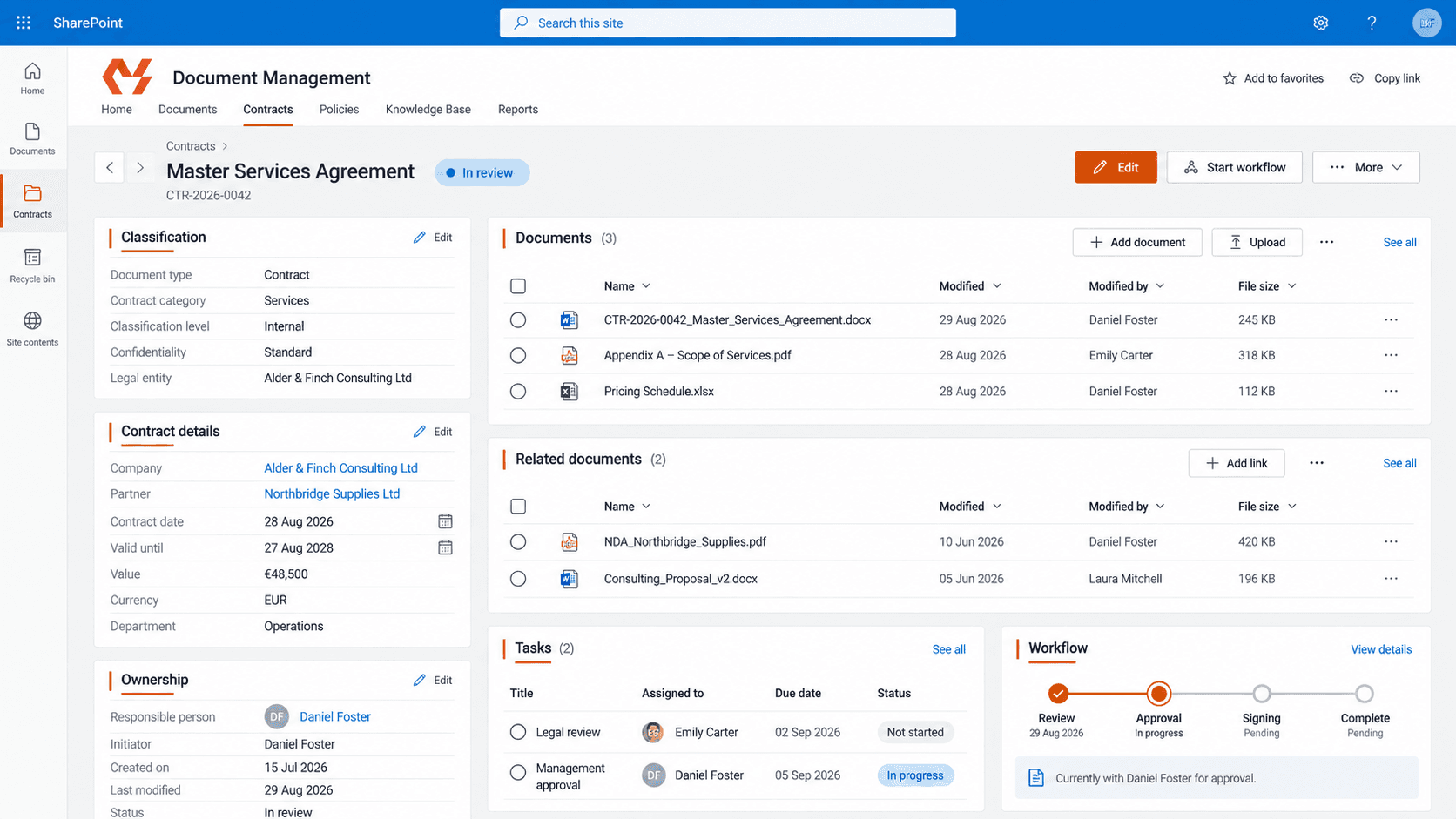
The MS Solutions document management system brings a company's records, their data and related files together in structured registers. Employees find documents quickly and follow their status, while configurable workflows automate document flow, including approval, tasks and internal or external signing. The system runs in the company's own Microsoft 365 environment, and the data stays under the company's control.
View solution
Invoice Manager
Finance and accounting+1

Invoice Manager

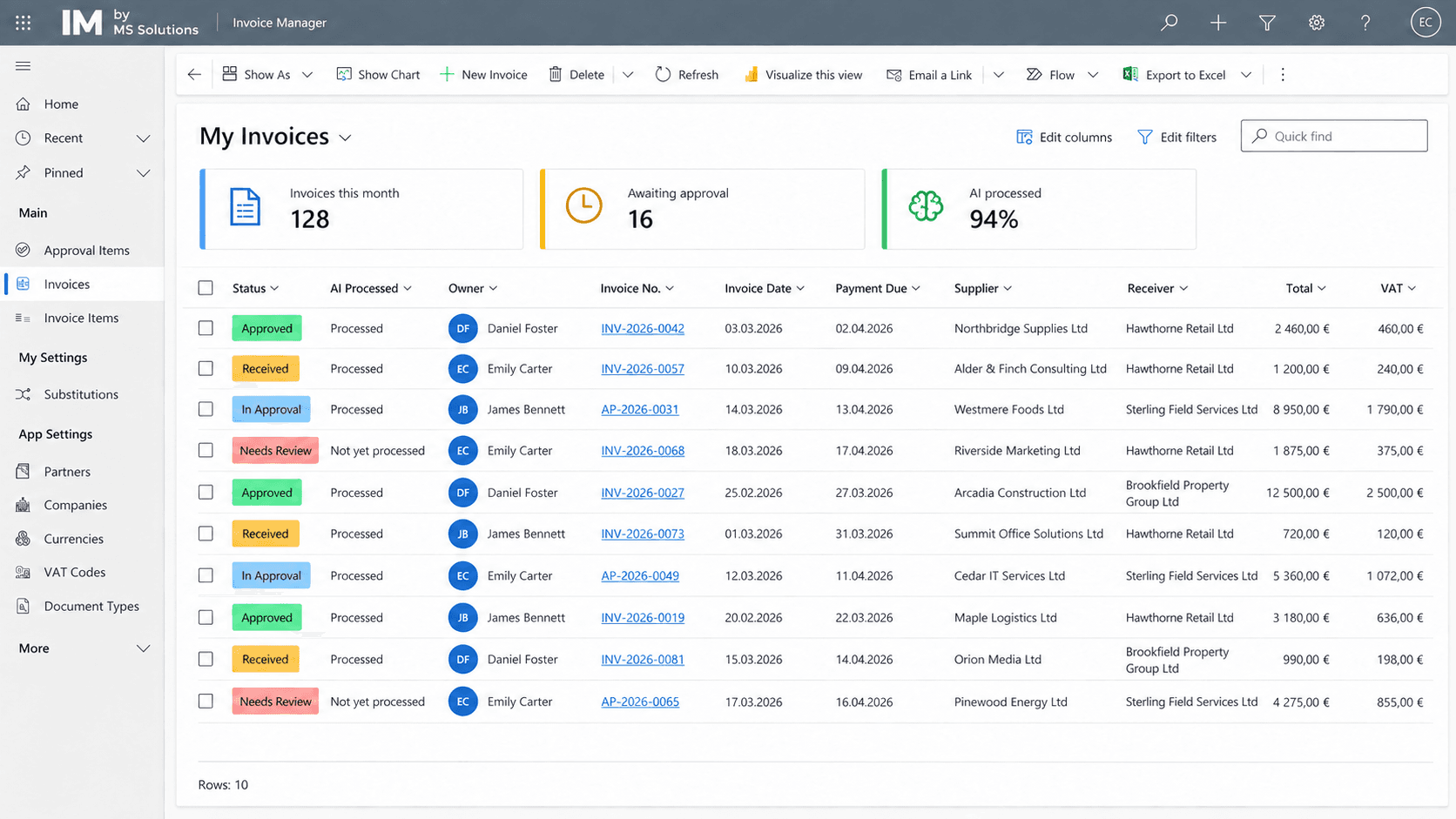
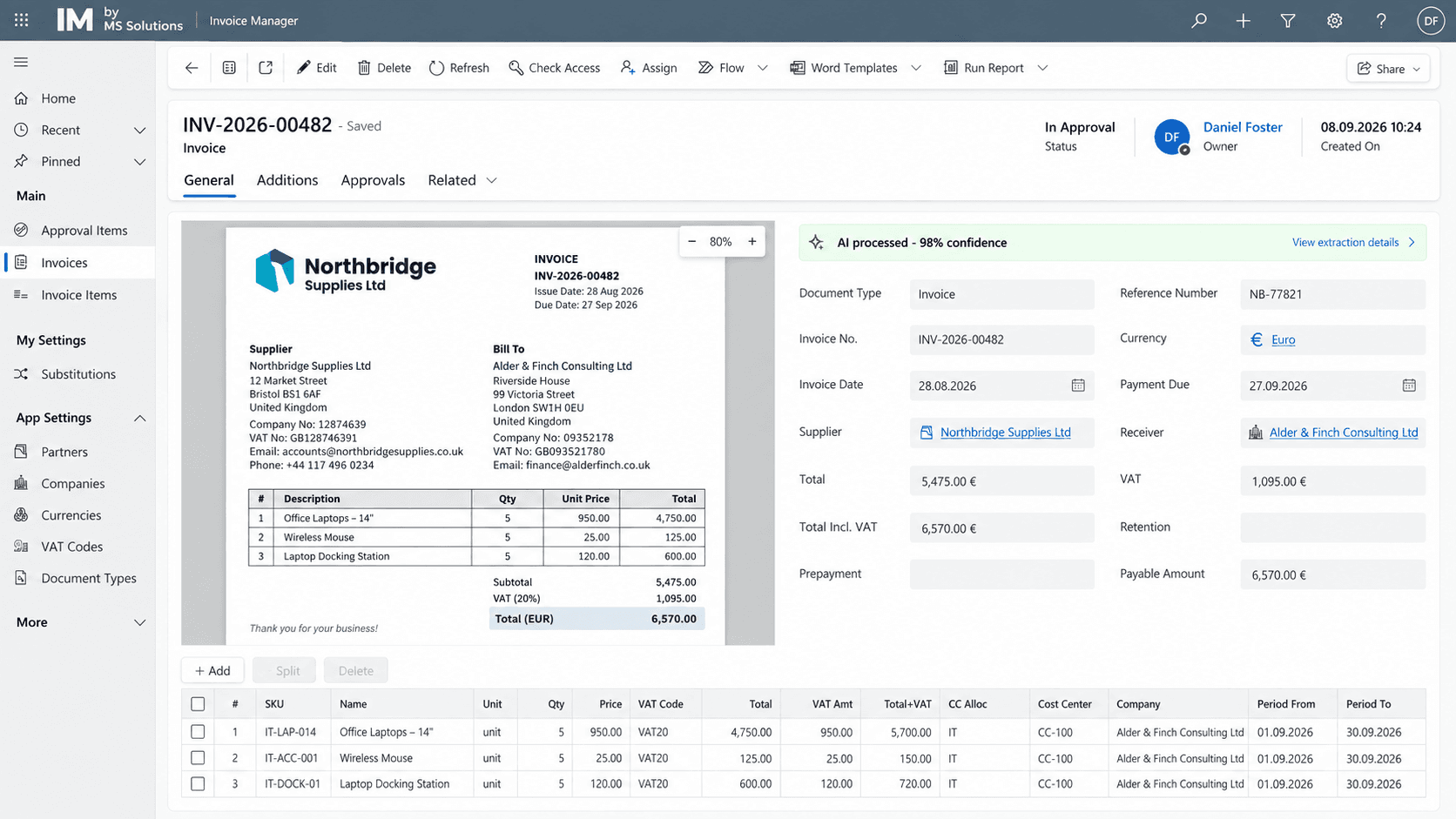
Invoice Manager is a company-tailored solution for processing invoices and related documents on Microsoft Power Platform. It receives documents, reads and enriches their data with AI, runs the company's approval process and, once approved, hands the information to the accounting or ERP system. The solution runs in the customer's own Microsoft environment, so data and access control stay with the company, while the app itself can be freely extended with new registers, processes and functionality.

View solution
Request and Support Management
Customer service+1

Request and Support Management

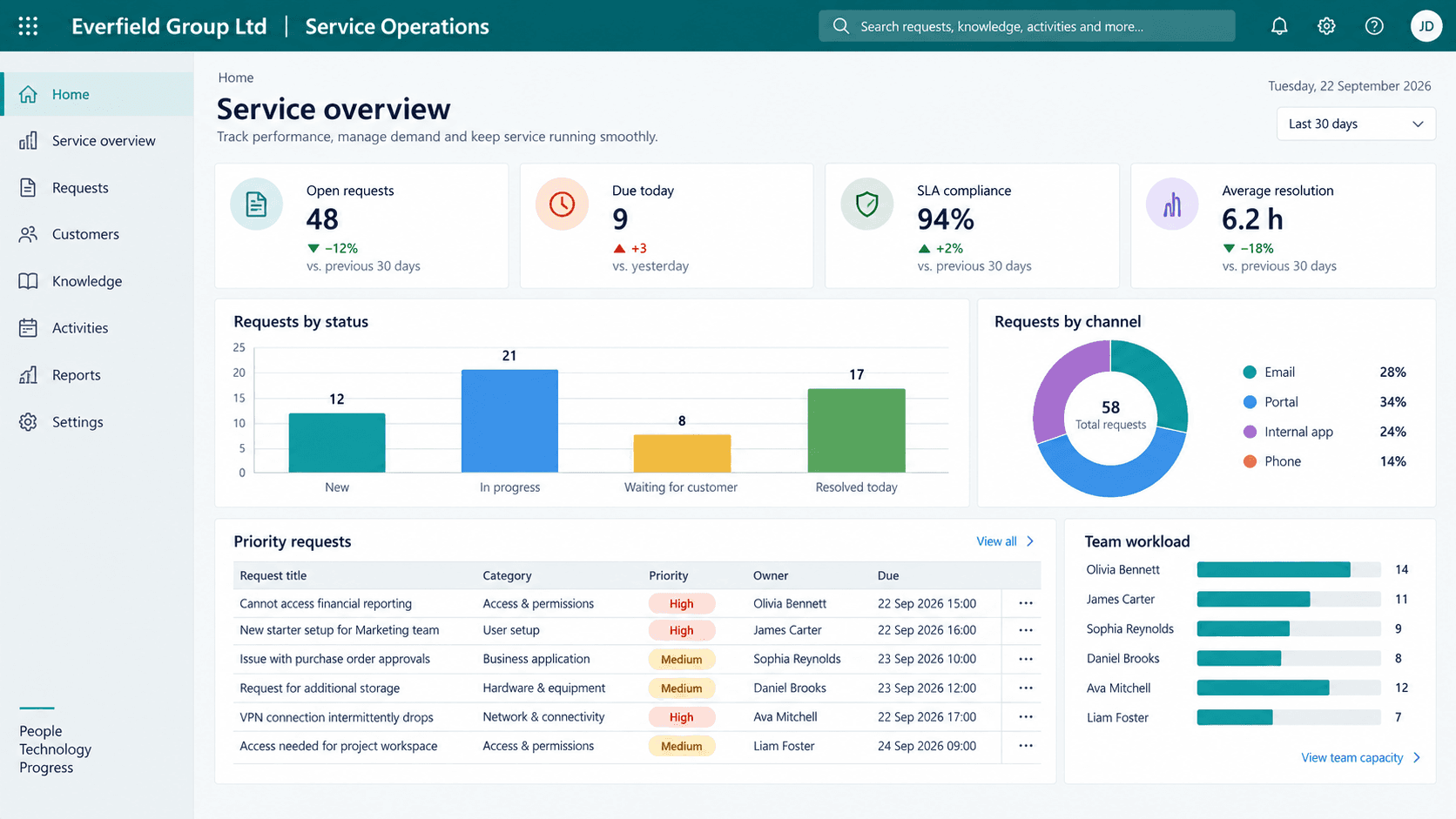
The request and support management solution receives requests from customers, employees or partners by email, external forms, portals or the company's internal apps and brings them into one system. Each request has its owners, priority, status, deadlines, correspondence and full history, while automation moves requests forward, sends notifications and keeps control. The solution runs in the customer's Microsoft environment and adapts freely to different request types and company processes.

View solution
CRM and Business Process Management
Sales and customers+1

CRM and Business Process Management

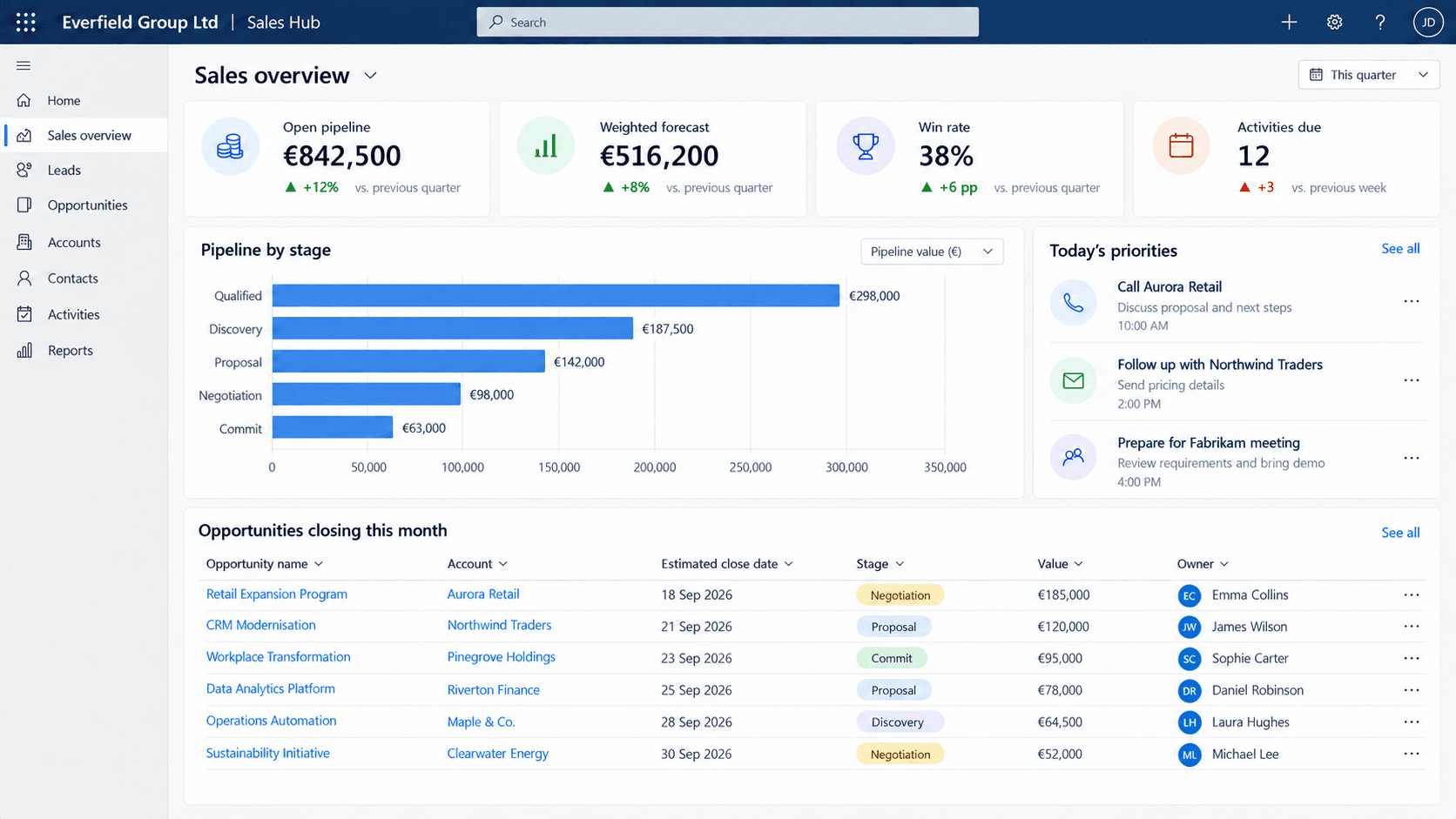
A CRM and business process solution for companies whose operating process is wider or more specific than a standard CRM covers. The system is shaped precisely to how the company already works and can connect customer and deal management with purchasing, planning, execution, projects, deliveries and other process stages. It runs in the customer's Microsoft environment and extends freely with new registers, processes, automation and integrations.

View solution
Project Management and Cost Tracking
Projects+1

Project Management and Cost Tracking

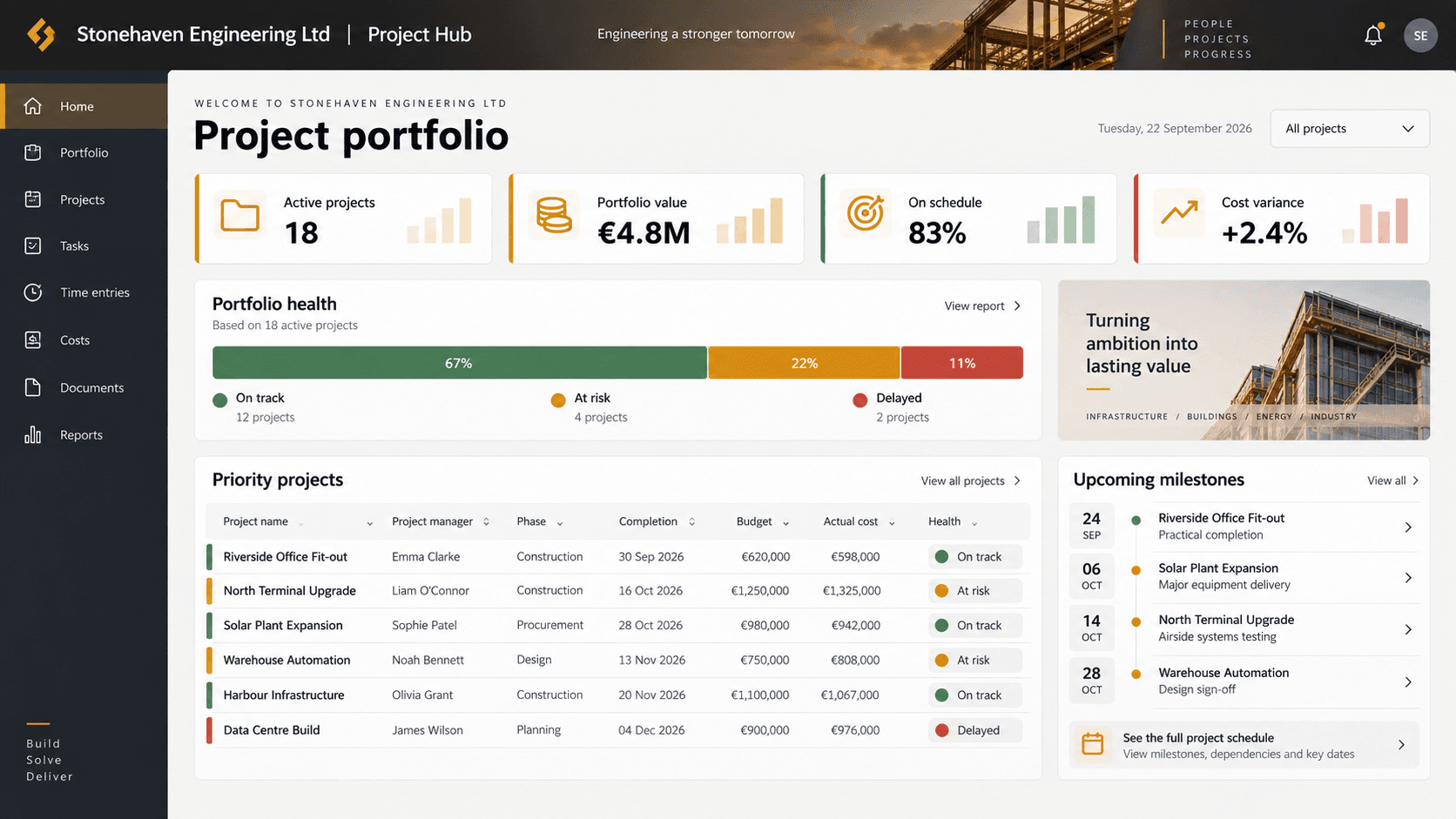
The project management solution brings project master data, tasks, documents and cost tracking into one system. Every project follows the company's defined process and a shared document structure, while employees record completed work, time spent, materials and other actual costs. Managers see project progress, documentation and a detailed breakdown of planned versus actual costs in one place.

View solution
Delivery and Logistics Process Management
Operations and logistics+1

Delivery and Logistics Process Management

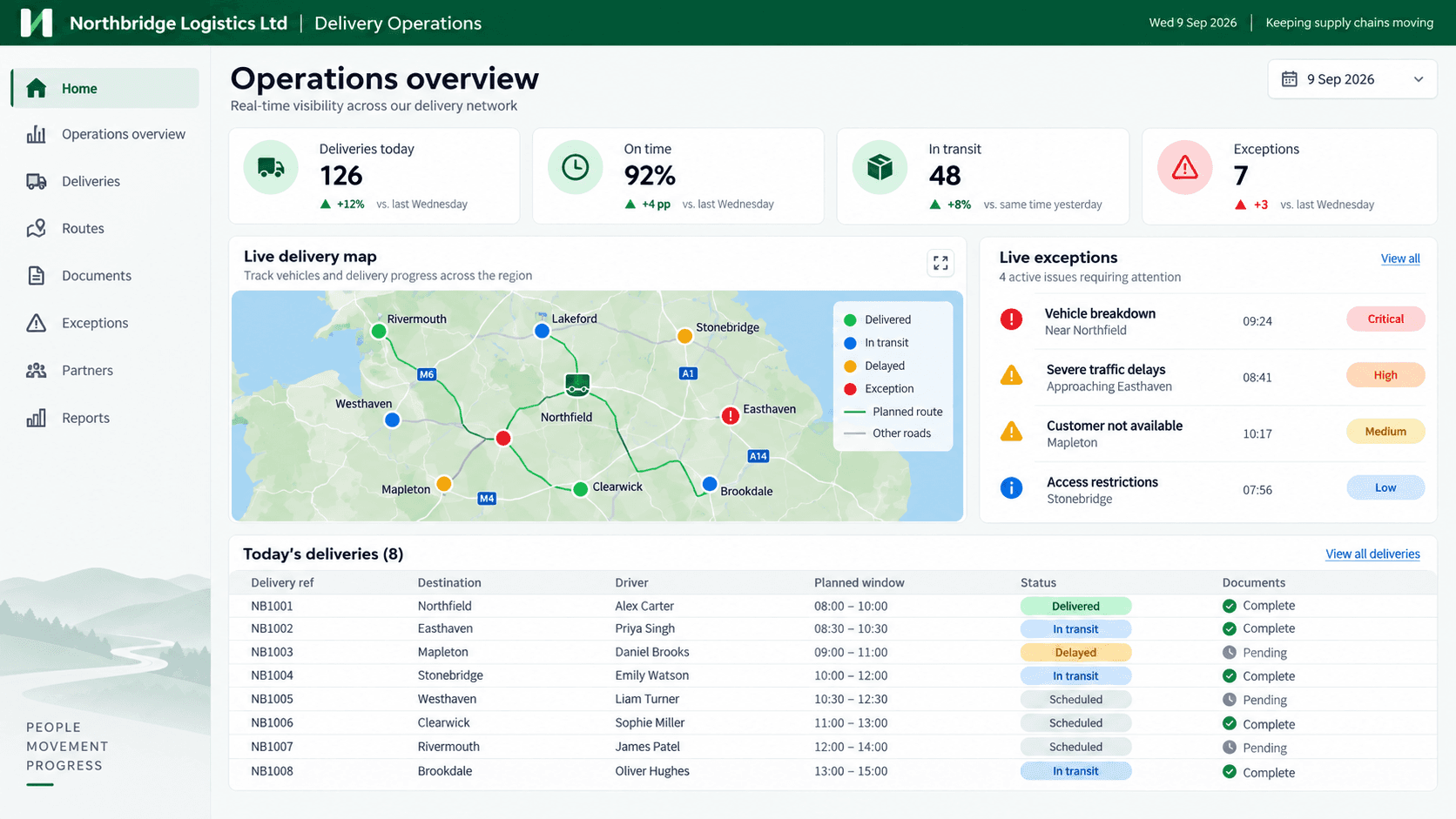
The delivery management solution digitises the company's delivery process — from receiving documents and photos to data processing, status control and preparing delivery notes or other related documents. Employees on site or in the warehouse register a delivery quickly in a mobile app, while office staff manage delivery data, documents and the full process history in one system. The solution is shaped to the company's logistics process and connected to document management, ERP, accounting or other systems.

View solution
HR Portal and Intranet
People and internal communication

HR Portal and Intranet

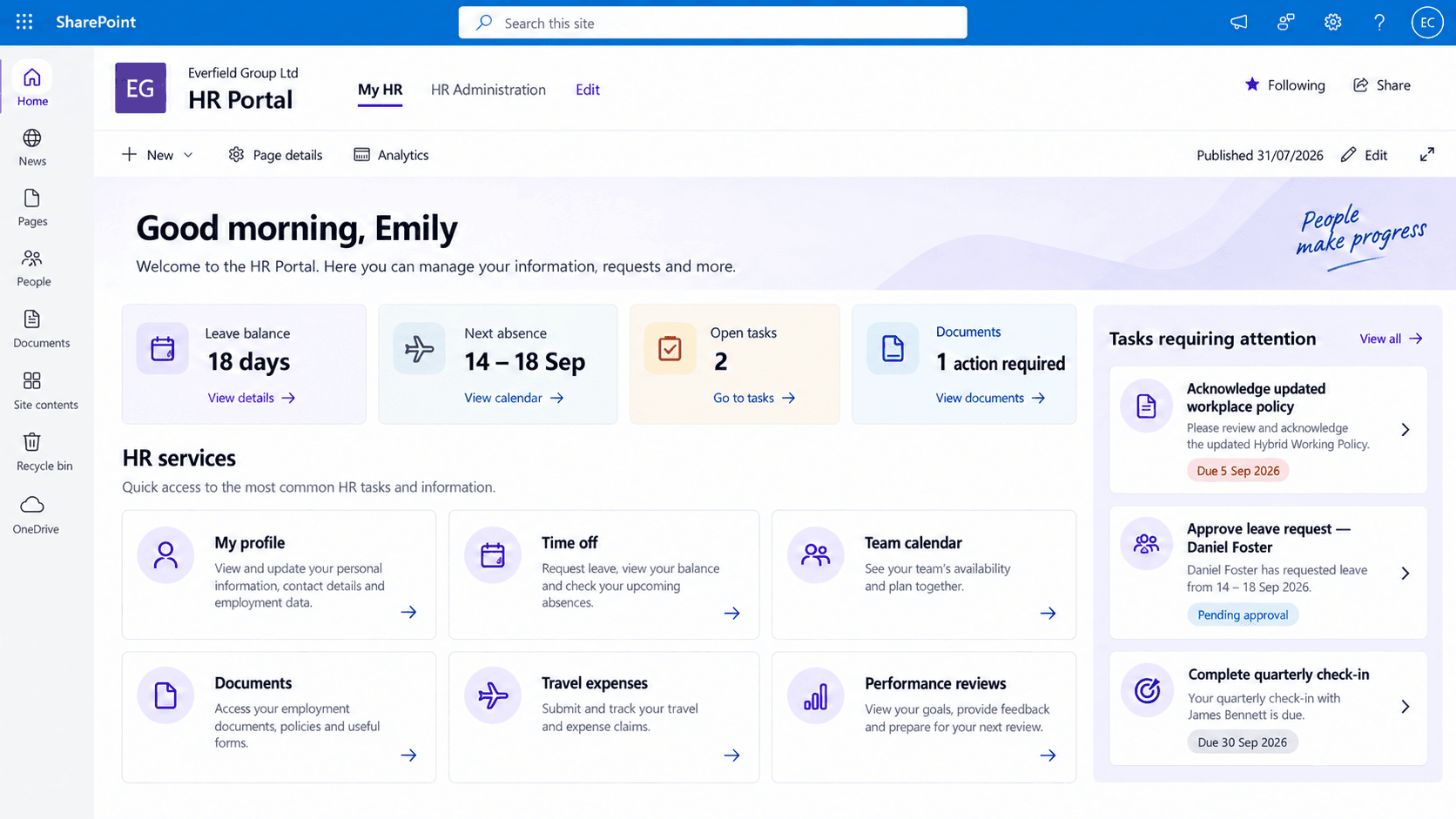
The SharePoint-based HR portal gives employees one place for HR requests, forms, documents and self-service processes. Intranet functionality adds company news, shared knowledge, guidelines and contact information. Content, processes and access adapt to each department, role and company's needs.

View solution
External Customer and Partner Portals
Customer service+1

External Customer and Partner Portals

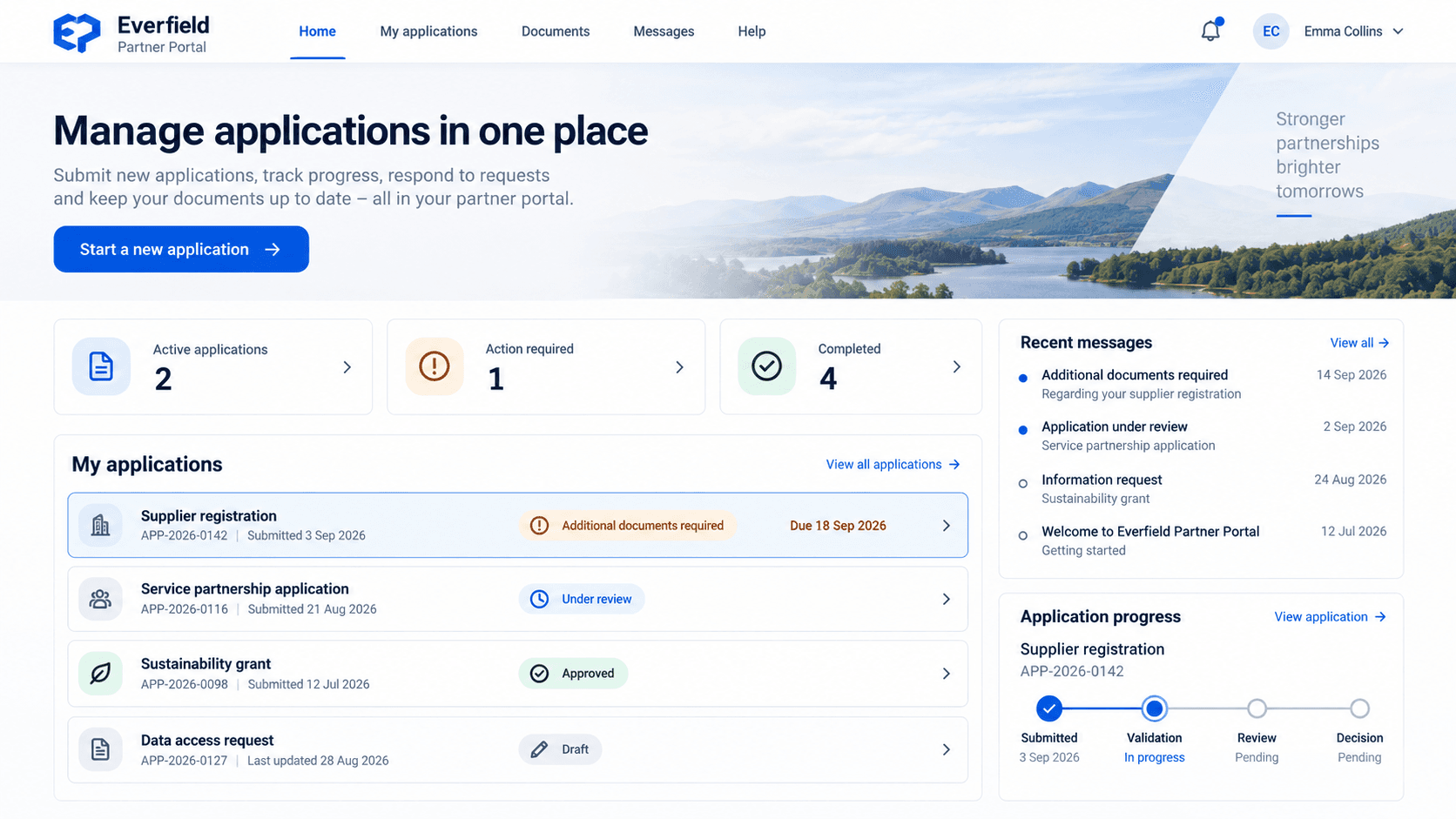
Tailored portals give customers, partners or the public a convenient digital channel to submit applications, data and documents and follow the progress of their case. Behind the portal runs a company-specific processing environment where information is checked, the applicant is contacted, approvals are made and contracts or other documents are prepared automatically. Each portal is built for a specific service and connected to the company's internal systems.

View solution
Dynamics 365 Business Central
Finance and accounting+3

Dynamics 365 Business Central

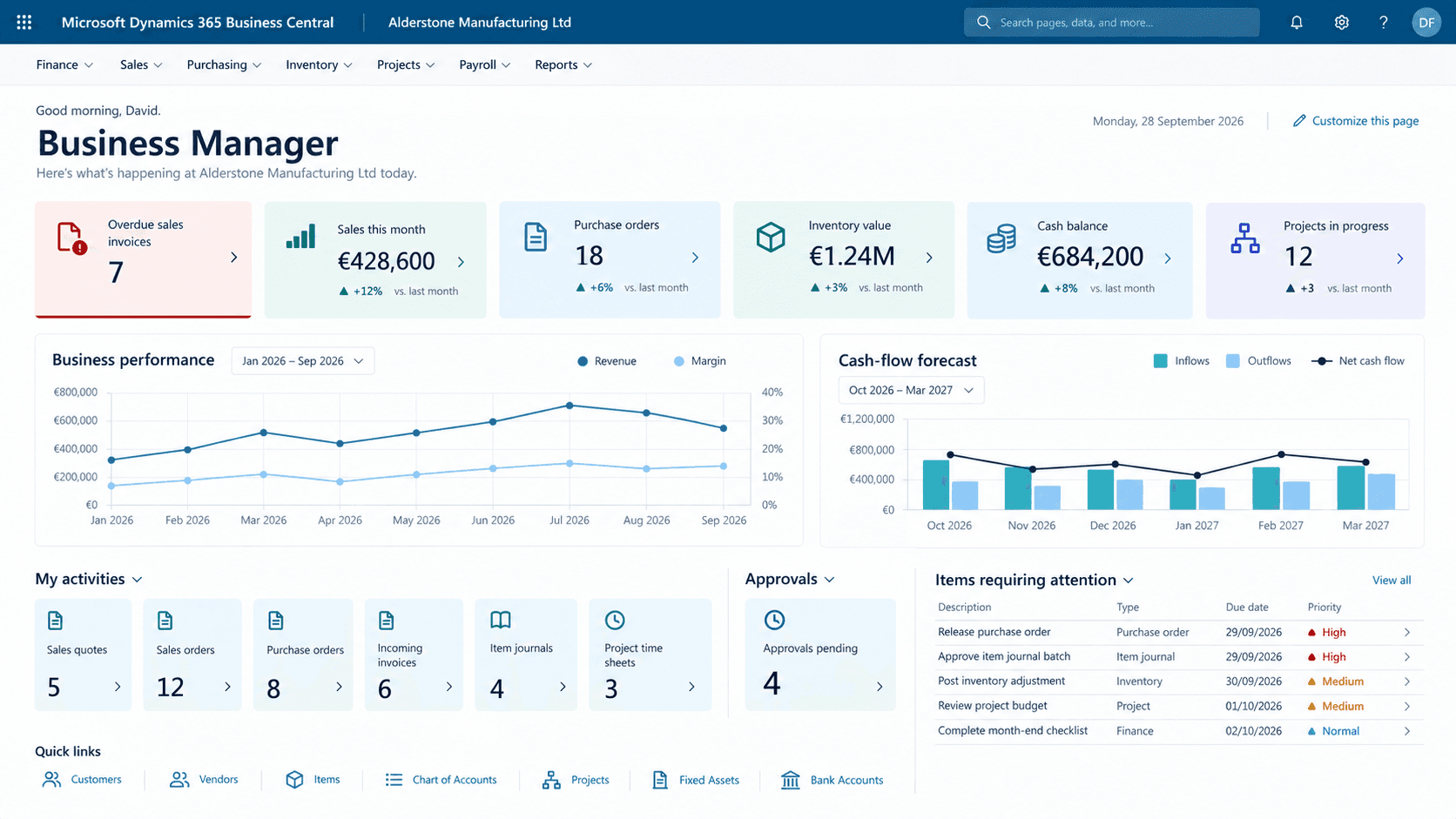
The MS Solutions Business Central solution brings a company's finance, sales, purchasing, inventory and projects into one accounting system with Latvian localisation and payroll. Accounting and management work with the same data, while invoices, documents and reports from the rest of the company's Microsoft environment reach the system without re-entry. The system runs in the company's Microsoft cloud, and the data, configuration and access rights stay under the company's control.

View solution
01Documents and records

Document Management System

Back to overview

The MS Solutions document management system brings a company's records, their data and related files together in structured registers. Employees find documents quickly and follow their status, while configurable workflows automate document flow, including approval, tasks and internal or external signing. The system runs in the company's own Microsoft 365 environment, and the data stays under the company's control.

Document Management System — Document workspace
1 / 5

Main capabilities

  • Structured document registers with a shared classification and automatic numbering
  • One document card holds the metadata, related projects, companies and every file of the document
  • Configurable cards, statuses, automatic numbering and access rights
  • Configurable workflows for approval, signing, notifications and tasks
  • Workflows start automatically based on document type, status or other parameters
  • Internal and external signing, with the signed document returned to the system automatically

Technologies

Microsoft 365SharePoint OnlineSharePoint Framework (SPFx)Power AutomateMicrosoft Entra IDAzure FunctionseParakstsSmart-IDDokobitE-adreseERP and accounting integrations
02Finance and accounting

Invoice Manager

Back to overview

Invoice Manager is a company-tailored solution for processing invoices and related documents on Microsoft Power Platform. It receives documents, reads and enriches their data with AI, runs the company's approval process and, once approved, hands the information to the accounting or ERP system. The solution runs in the customer's own Microsoft environment, so data and access control stay with the company, while the app itself can be freely extended with new registers, processes and functionality.

Invoice Manager — Invoice processing
1 / 2

Main capabilities

  • Invoices, delivery notes, CMRs and other documents arrive by email or manual upload
  • Header data and line items are read and validated automatically with AI
  • Customer-defined dimensions such as VAT codes, cost centres, categories and SKUs are matched automatically
  • Configurable multi-step approval chains, selected by document data and conditions
  • Two-way integrations with accounting and ERP systems: partners and dimensions in, approved documents out

Technologies

Power Apps (model-driven apps)Microsoft DataversePower AutomatePower Apps Component Framework (PCF)Azure FunctionsCustom ERP and accounting integrations

Integration experience

Horizon · Jumis · Sage · Microsoft Dynamics 365 · Hansa · Moneo · other and custom ERP/accounting systems

03Customer service

Request and Support Management

Back to overview

The request and support management solution receives requests from customers, employees or partners by email, external forms, portals or the company's internal apps and brings them into one system. Each request has its owners, priority, status, deadlines, correspondence and full history, while automation moves requests forward, sends notifications and keeps control. The solution runs in the customer's Microsoft environment and adapts freely to different request types and company processes.

Request and Support Management — Service overview
1 / 3

Main capabilities

  • Requests arrive from email, external forms, a portal or the company's internal app
  • Configurable request card with categories, priority, owners, attachments and related information
  • Automatic classification, routing and owner assignment by defined rules
  • Correspondence with the requester directly in the system, sending and receiving emails from the request card
  • One timeline with correspondence, notes, attachments, status changes and the full action history
  • Deadline control, automatic notifications, reminders, reports and integrations with other systems

Technologies

Power Apps (model-driven and canvas apps)Microsoft DataversePower AutomateMicrosoft 365Azure FunctionsCustom integrations
04Sales and customers

CRM and Business Process Management

Back to overview

A CRM and business process solution for companies whose operating process is wider or more specific than a standard CRM covers. The system is shaped precisely to how the company already works and can connect customer and deal management with purchasing, planning, execution, projects, deliveries and other process stages. It runs in the customer's Microsoft environment and extends freely with new registers, processes, automation and integrations.

CRM and Business Process Management — Sales overview
1 / 4

Main capabilities

  • Leads arrive from external forms, email and other sources and are linked automatically to existing companies and contacts
  • One place for companies and contacts with documents, activities, correspondence and the full communication timeline
  • Lead qualification and conversion to a deal with company-specific process stages, required data and automated rules
  • Emails sent and received in the system, plus an Outlook integration to attach correspondence to a customer, deal or other record
  • The process continues after a won deal — planning, preparation, project delivery, shipments, production or other company stages
  • Role-based access rights, integrations with other systems and data analysis in Excel or Power BI

Technologies

Power Apps (model-driven apps)Microsoft DataversePower AutomatePower Apps Component Framework (PCF)Microsoft OutlookSharePoint OnlinePower BIAzure FunctionsCustom integrations
05Projects

Project Management and Cost Tracking

Back to overview

The project management solution brings project master data, tasks, documents and cost tracking into one system. Every project follows the company's defined process and a shared document structure, while employees record completed work, time spent, materials and other actual costs. Managers see project progress, documentation and a detailed breakdown of planned versus actual costs in one place.

Project Management and Cost Tracking — Project portfolio
1 / 3

Main capabilities

  • One project register with statuses, owners, deadlines and all related information
  • A document and folder structure created automatically and shared by every project
  • Configurable project stages, tasks, workflows, notifications and control rules
  • A separate app for employees to record working time, completed tasks, materials used and other costs
  • Planned and actual costs broken down by project, task, work item or cost category
  • Management reports and integrations with accounting, ERP or other company systems

Technologies

SharePoint OnlinePower Apps (model-driven and canvas apps)Microsoft DataversePower AutomateSharePoint Framework (SPFx)ReactAzure Static Web AppsMicrosoft Entra IDPower BICustom integrations
06Operations and logistics

Delivery and Logistics Process Management

Back to overview

The delivery management solution digitises the company's delivery process — from receiving documents and photos to data processing, status control and preparing delivery notes or other related documents. Employees on site or in the warehouse register a delivery quickly in a mobile app, while office staff manage delivery data, documents and the full process history in one system. The solution is shaped to the company's logistics process and connected to document management, ERP, accounting or other systems.

Delivery and Logistics Process Management — Delivery overview
1 / 3

Main capabilities

  • Deliveries registered in a mobile app with photos, documents and the required delivery data
  • Delivery documents received automatically from email, scanned files or other systems
  • Documents split and their data read, checked and linked automatically to the matching delivery
  • One delivery register with statuses, owners, related documents and the full processing history
  • Delivery notes and other delivery documents prepared in the system, with configurable workflows and notifications
  • Two-way integrations with document management, warehouse, ERP, accounting and other company systems

Technologies

Power Apps (model-driven apps)Microsoft DataversePower AutomateReactAzure Static Web AppsMicrosoft Entra IDSharePoint Online.NETCustom ERP and logistics integrations
07People and internal communication

HR Portal and Intranet

Back to overview

The SharePoint-based HR portal gives employees one place for HR requests, forms, documents and self-service processes. Intranet functionality adds company news, shared knowledge, guidelines and contact information. Content, processes and access adapt to each department, role and company's needs.

HR Portal and Intranet — Employee portal
1 / 5

Main capabilities

  • HR forms, requests and self-service
  • Onboarding, tasks and approvals
  • Documents, procedures, templates and a knowledge base
  • Targeted company news and announcements
  • Employee and department directory
  • Personalised content and access rights

Technologies

Microsoft 365SharePoint OnlineSharePoint Framework (SPFx)Power AutomateCustom integrations
08Customer service

External Customer and Partner Portals

Back to overview

Tailored portals give customers, partners or the public a convenient digital channel to submit applications, data and documents and follow the progress of their case. Behind the portal runs a company-specific processing environment where information is checked, the applicant is contacted, approvals are made and contracts or other documents are prepared automatically. Each portal is built for a specific service and connected to the company's internal systems.

External Customer and Partner Portals — Application portal
1 / 3

Main capabilities

  • Public or authenticated application forms
  • Submission of data, documents and attachments
  • Internal processing environment for applications
  • Statuses, owners and approval stages
  • Correspondence, requests for additional data and notifications
  • Automatic preparation of contracts and other documents
  • Integrations with the company's internal systems

Technologies

React.NETMicrosoft AzureAzure FunctionsCustom APIs and integrations
09Finance and accounting

Dynamics 365 Business Central

Back to overview

The MS Solutions Business Central solution brings a company's finance, sales, purchasing, inventory and projects into one accounting system with Latvian localisation and payroll. Accounting and management work with the same data, while invoices, documents and reports from the rest of the company's Microsoft environment reach the system without re-entry. The system runs in the company's Microsoft cloud, and the data, configuration and access rights stay under the company's control.

Dynamics 365 Business Central — Business overview
1 / 3

Main capabilities

  • Financial accounting, VAT returns, cash documents, Intrastat and EDS reports to Latvian requirements
  • Payroll with taxes, holidays and sick leave, reports in EDS formats
  • Sales, purchasing and inventory in one data flow from quote to invoice and warehouse movement
  • Project accounting with resources, costs and project invoicing
  • Approved incoming invoices reach the system automatically from the invoice processing solution
  • Data available in Outlook, Teams, Excel and Power BI reports

Technologies

Microsoft Dynamics 365 Business CentralMicrosoft 365Power BIPower AutomateAL extensionsAppSourceMicrosoft Entra IDLatvian localization and payroll

Don't see your process?

Tell us how your company works. In a free 30-minute consultation we'll go through what from this fits you.

Get in touch